xTB Calculations
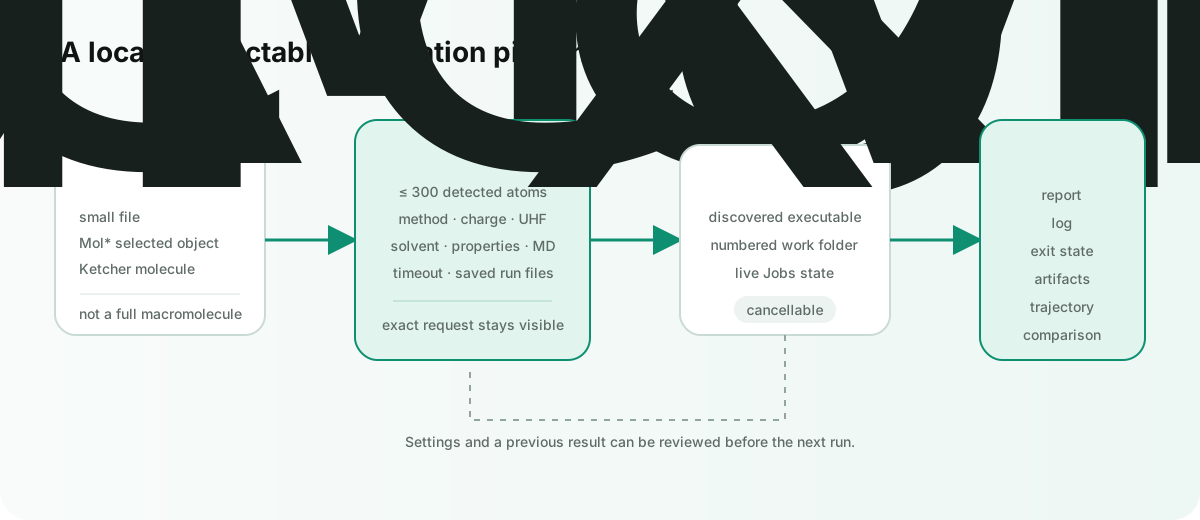
Burette can run the local xtb executable against a small-molecule file or a molecular object extracted from the active Mol* context. Calculations stay on the machine and produce reviewable logs, reports, structures, properties, and trajectories.
xTB is an external scientific program, not bundled into Burette. A completed process proves that the workflow ran; it does not by itself validate the scientific suitability of the method, charge, spin, solvent, or starting geometry.
Install and check the runtime
The recommended install path used by Burette is:
pixi global install xtb
xtb --version
In the desktop app, open the structure inspector, expand xTB, then use Settings → Check. Burette discovers xtb from common Pixi, local, Homebrew, and PATH locations. When Pixi is available, the app can also invoke its xTB installer.
Start a calculation
- Open a small molecule, or select a ligand/object inside a larger Mol* scene.
- Open the inspector and expand xTB.
- Review method, charge, UHF, solvation, and output settings.
- Choose an operation.
- Follow progress in the Jobs bottom-dock tab; cancel there if needed.
Direct xTB, CREST, and PRISM jobs are guarded at 300 detected atoms. For a larger macromolecular document, select the intended object or open a small-molecule file instead of sending the full structure.
Inspector operations
| Action | What Burette requests |
|---|---|
| Optimize | Geometry optimization at the chosen GFN method and convergence level. |
| Properties | Single-point calculation plus selected electronic-property outputs. |
| Frequencies | Geometry optimization followed by a Hessian calculation. |
| IP/EA | Vertical ionization-potential and electron-affinity calculation. |
| Fukui | Fukui reactivity calculation. |
| MD | Finite-temperature xTB molecular dynamics. |
| Metadyn | Biased dynamics for broader conformational exploration. |
Ketcher can send one sketch to the same xTB optimization workflow. A multi-record SDF, CSV, or TSV collection is not a single xTB geometry; open one molecule in Mol* before calculating it.
Settings
- Method: GFN2, GFN1, GFN0, or GFN-FF.
- Optimization: loose, normal, tight, or very tight convergence.
- Electronic state: total charge, UHF/unpaired-electron count, accuracy, and electronic temperature.
- Parallelism: an explicit thread count, or zero to let xTB use its default.
- Solvation: none, ALPB, GBSA, COSMO, or CPCM-X with a supported solvent name.
- Property outputs: dipole, Wiberg bond orders, Mulliken populations, Molden, polarizability, FOD, ESP, and Fukui artifacts.
- Dynamics: temperature, total time, integration step, and snapshot count.
- Output: persist run files and set the wall-clock timeout. MD and metadynamics receive a longer minimum timeout.
Right-click an operation button to open settings scoped to that calculation. Use the main Settings action for all categories.
Results and reproducibility
When Save run files is enabled for a file-backed input, Burette creates a numbered folder beside the source, such as xtb_optimize_1 or xtb_properties_1. Otherwise it uses the application cache.
Every job records:
- the exact executable and arguments;
- elapsed time and exit code;
xtb.logand anxtb-report.mdsummary;- detected result artifacts and a primary artifact when one is safe to open;
- success, recovered/partial, failed, or cancelled state in Jobs.
An optimization can replace the active Mol* view with the optimized structure or its multi-frame optimization trajectory. A successful file-backed optimization can open the original and optimized structures together in the active Mol* view.
Minimal smoke test
Use a small, known molecule rather than a production structure:
- Open a valid small XYZ, MOL, or SDF file.
- Leave the default GFN2, neutral-charge, gas-phase settings only if they match that molecule.
- Run Optimize.
- Confirm Jobs reaches success, the report and log open, and an optimized structure or trajectory appears.
- Read the report for the exit code, command, working directory, and warnings.
If the executable is missing, the input exceeds the atom guard, the timeout is reached, or xTB exits non-zero, Burette keeps the failure visible and does not label a partial artifact as a complete result.
For conformer sampling rather than one local optimization, continue to CREST and PRISM.