CREST and PRISM
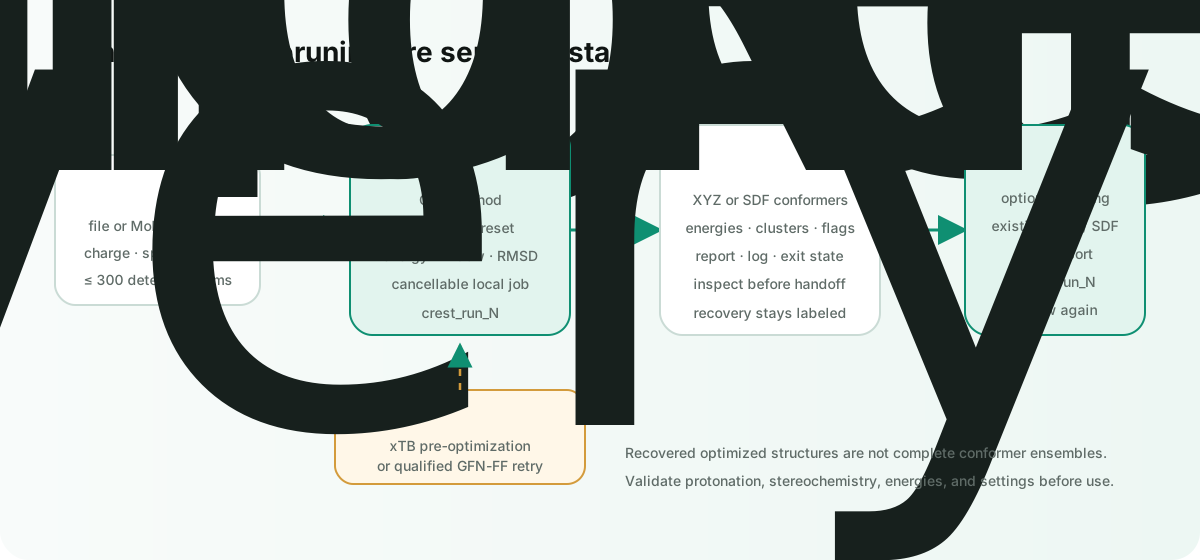
The desktop inspector has a Conformers section for two distinct local workflows:
- CREST samples a low-energy conformer ensemble from a small molecule or selected Mol* object.
- PRISM Pruner processes an existing XYZ or SDF ensemble to reduce redundant conformers.
They are related stages, not interchangeable calculations.
Install the external tools
CREST:
pixi global install crest
crest --version
PRISM Pruner, when you want the optional pruning stage:
uv tool install prism_pruner
prism_pruner --help
Open Conformers → Settings → Check to see which executables Burette discovered. CREST and PRISM are not bundled with the app.
Run CREST
- Open a supported small-molecule document, or select a ligand/object in Mol*.
- Expand Conformers in the inspector.
- Check the scope label when a selected object will be extracted from a larger scene.
- Review the calculation settings.
- Choose CREST and follow the job in Jobs.
The supported document families include XYZ, SDF/SD, MOL, MOL2, SMI/SMILES, PDB/PDBQT/ENT, and CIF/mmCIF. Direct chemistry jobs are disabled above 300 detected atoms; select the intended molecular object instead of running the full macromolecule.
CREST settings
- GFN2, GFN1, GFN0, or GFN-FF method.
- Automatic, normal, quick,
squick, ormquicksampling. - Gas phase or the supported water, methanol, acetonitrile, DMSO, and chloroform solvent presets.
- Charge, UHF value, and 1–16 threads.
- Energy window in kcal/mol and RMSD threshold in angstroms.
- A wall-clock timeout, with one hour as the default.
Results and recovery
CREST runs in a numbered crest_run_N folder beside a file-backed source when possible. Burette writes a report and combined log, collects recognized ensemble and fallback artifacts, opens the primary reviewable result, and records the job state.
If CREST fails during initial geometry optimization, Burette can retry after an xTB pre-optimization. It can also retry without implicit solvent after that pre-optimization, or fall back to GFN-FF for a qualifying initial-geometry failure. A recovered structure is marked as recovery output in the report; review it before treating it as a conformer ensemble.
You can cancel a running conformer job from Jobs. Timeout, cancellation, non-zero exit state, and any recovered artifact remain explicit in the report.
Inspect an ensemble
Burette recognizes multi-frame XYZ and multi-record SDF/SD ensembles. The conformer summary reports the detected source, conformer count, atom count, available energies, relative energy range, cluster markers, and pipeline recommendations.
Use the ensemble review surface before downstream DFT, property prediction, docking, or FEP work. Confirm that conformers have the expected protonation, stereochemistry, charge, spin, and energy convention.
Run PRISM Pruner
PRISM is enabled only for an existing XYZ or SDF/SD ensemble:
- Open the ensemble produced by CREST or another tool.
- Expand Conformers.
- Review the PRISM timeout and energy-sort option.
- Choose PRISM.
- Inspect the pruned ensemble, report, and log in the generated
prism_run_Nfolder.
Do not use PRISM as a substitute for conformer generation: it expects an ensemble, while CREST can start from one small-molecule structure.
Minimal smoke test
For CREST, start with a small neutral organic molecule and a fast sampling preset. Confirm that Jobs completes, crest_run_N contains the report and log, and Burette opens a multi-conformer output or clearly labels a recovered fallback.
For PRISM, use a small XYZ or SDF with several conformers. Confirm that the input is accepted as an ensemble, Jobs completes, and the report identifies the output chosen for review.
For a single geometry optimization or electronic properties, use xTB calculations instead.