Drag and Drop
Drag and drop in the desktop workspace is target-aware. The same molecule can open as a new document, join a grid, enter Ketcher, become a docking ligand, or be added to an xyzrender sheet depending on where you release it.
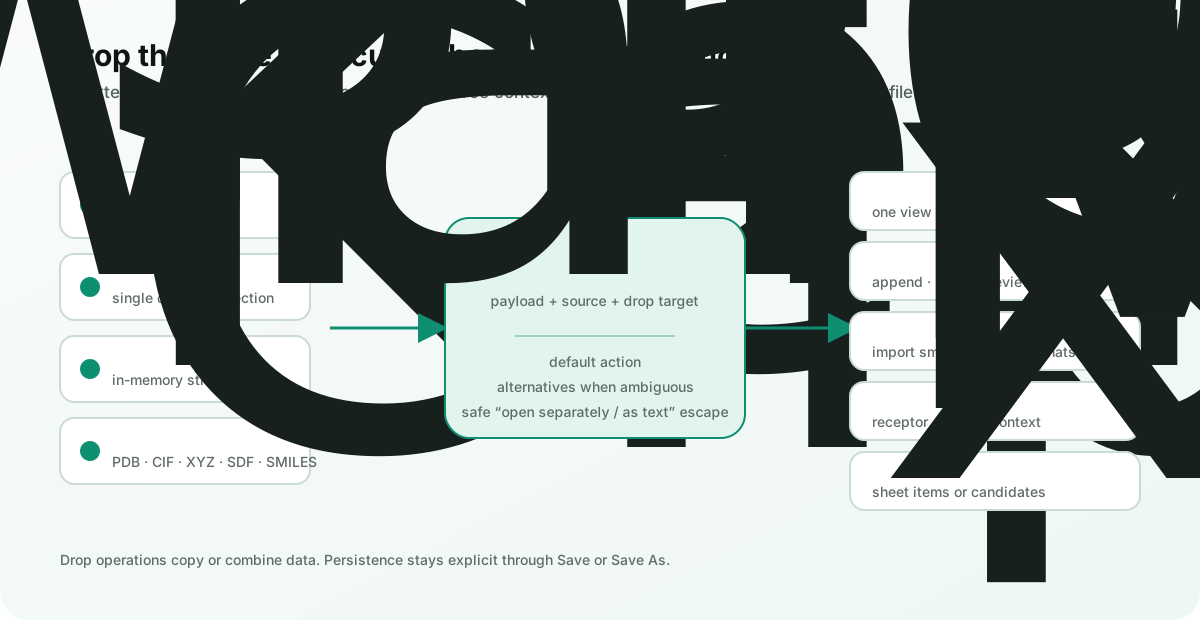
The action is resolved from both the dragged payload and the drop target. When more than one interpretation is valid, Burette shows a choice menu at the drop position.
What you can drag
- Files from Finder.
- Files and groups from the project sidebar.
- One tab or a multi-selection of tabs.
- Molecule rows and records from a collection grid.
- A Ketcher sketch.
- Plain structure text or file paths from the clipboard.
Inline text is recognized when it looks like PDB, CIF, XYZ, SDF/MOL, or a single SMILES record. File-path text can be a Unix path, a Windows path, a file:// URL, or a recognized molecular filename.
What happens at each target
| Drop target | Default behavior | Alternatives or requirements |
|---|---|---|
| Empty workspace | Open the document. Multiple files default to Open in One Window. | Multiple files can instead open as a grid or as document tabs. |
| RDKit collection grid | Append compatible molecule records or collection data. | A whole collection can be merged, opened separately, or opened as text. |
| Ketcher | Import MOL, SD/SDF, SMI, or SMILES structures into the editor. | Unsupported files fall back to normal document opening. |
| Mol* structure | Build a combined docking view when the target and dragged structures form a valid receptor/ligand combination. | You can still open the files separately or as text. |
| Existing docking view | Add ligand paths or inline molecule records to the existing receptor context. | The receptor stays fixed while ligand inputs are combined. |
| xyzrender document | Add paths or inline records to the current xyzrender sheet. | The sheet keeps the existing target document active. |
| FEP setup workspace | Attach the dropped candidates to the current FEP setup request. | The receptor, ligand grid, docking document, and reference pose stay explicit. |
Practical recipes
Compare several poses in one view
- Select several compatible structure files in Finder or the Burette sidebar.
- Drop them onto the workspace.
- Keep Open in One Window to combine the poses, or choose Open as document tabs to keep independent renderer state.
Add molecules to an open collection
- Open an SDF, SMI/SMILES, CSV, or TSV collection as a grid.
- Drag another compatible collection or an inline molecule record onto the grid.
- Choose Append to grid for records, or Merge molecule collections for complete files.
- Use Save or Save As… after reviewing the result.
Turn a selected ligand into a docking view
- Open the receptor in Mol*.
- Drag a ligand file or a molecule row onto the viewer.
- Choose Open docking view when Burette offers it.
Clipboard input
Paste or drop structure text when creating a temporary file would interrupt the workflow. Burette preserves recognized text as an in-memory structure record and assigns a matching extension. Drags that originate from collection rows carry those molecule records directly into compatible targets.
Safety and limits
- Drag operations copy or combine data; they do not silently delete the source file.
- Collection merge accepts one family at a time: SDF, SMILES, CSV, or TSV.
- CSV/TSV merge requires identical headers in identical column order, and unsupported payload members reject the whole merge.
- Ketcher import is limited to its small-molecule formats.
- Docking actions only appear when Burette can identify a valid structural anchor and compatible ligand input.
- If the semantic action is not appropriate, choose Open separately or Open as text file from the drop menu.
See SDF and molecule collections for merge rules and collection editing.